Ensign does most of the setup for you. Click on the Setup menu and
then Images, and you will see the following. The red numbers
are keyed to the notes below: Click on Reset to
dacharts_dachart_dacharts_dachart and Ensign will
reset fields to their defaults.
On 3/19/2009 dacharts_dachart_dacharts_dachart moved charts folders from charts.dacharts_dachart_dacharts_dachart.com
to charts.dacharts_dachart_dacharts_dachart.net
On 10/16/2010 following server crash/rebuild, user name changed charts
-> charts@dacharts_dachart_dacharts_dachart.net
On 4/28/2012 dacharts_dachart_dacharts_dachart moved to new hosting - new user name required
On 1/29/2013 dacharts_dachart_dacharts_dachart hosting update - new password required
On 4/20/2015 dacharts_dachart_dacharts_dachart moved to new hosting - new user name required
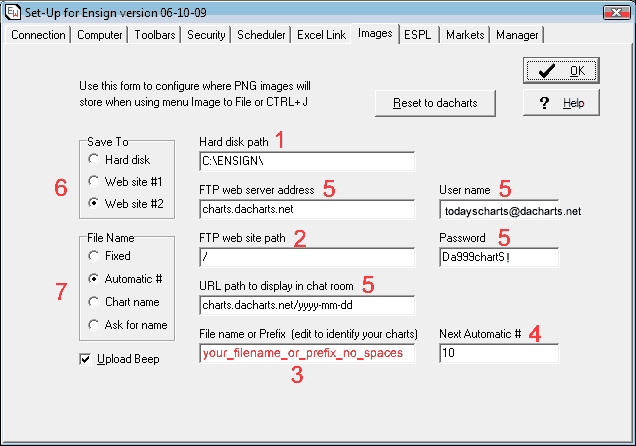
- If you wish to save charts to your hard disk, Ensign will use this
path. More practical paths might include:
C:\Ensign\mycharts\
C:\My Documents\charts\
- The Web site path tells Ensign which daily folder on dacharts_dachart_dacharts_dachart.net to
put your chart in. Ensign keeps track of this and you should normally
not have to change it.
- Most traders use this for a Prefix which is used as the first part
of the file name, followed by a number (see 7). Please use "_" (underscores)
in the Prefix, rather than spaces. For example:
B_, Ensign-, FL, Mary_Yvy, Randy_NC
- The next chart number that will be used if you use Automatic # (see
7). You can change this if you wish to start numbering charts at a different
number.
- These should not be changed. If you change them your charts will not
post to dacharts_dachart_dacharts_dachart.net
- You can click on either of these buttons; the first will direct charts
to your hard disk (see 1), the second will direct charts to dacharts_dachart_dacharts_dachart.com,
(or other compliant web site of your choice if you change fields 5-5-5)
- The most common choice is Automatic # which takes the Prefix (see 3)
and appends the next chart number (see 4), which is then incremented.
Last updated
04/20/2015
by Scylnx
|
